2022. szeptember 7., szerda

Amikor a CloudFlare Rocketloader elrontja a Divi vizuális szerkesztőjét - Uncaught ReferenceError: jQuery is not defined

Cloudflare has a tool called Rocket Loader™.

Rocket Loader prioritises your website’s content (text, images, fonts etc) by deferring the loading of all of your JavaScript until after rendering. On pages with JavaScript, this results in a much faster loading experience for your users and improves the following performance metrics:

– Time to First Paint (TTFP)
– Time to First Contentful Paint (TTFCP)
– Time to First Meaningful Paint (TTFMP)
– Document Load

All these things are great normally, but when it comes to your Page Builder… they seem to break everything. It doesn’t matter if your page builder loads a few hundred milliseconds faster if it ultimately doesn’t work when it loads.

However, you probably do still want this feature turned on for most of your website. So that was the problem I found myself in. Do I sacrifice page speeds for convenience? Or do I just turn off Cloudflare every time I needed to update my website? Luckily, the answer is neither.

The fix for me was to simply make a Cloudflare Page Rule.

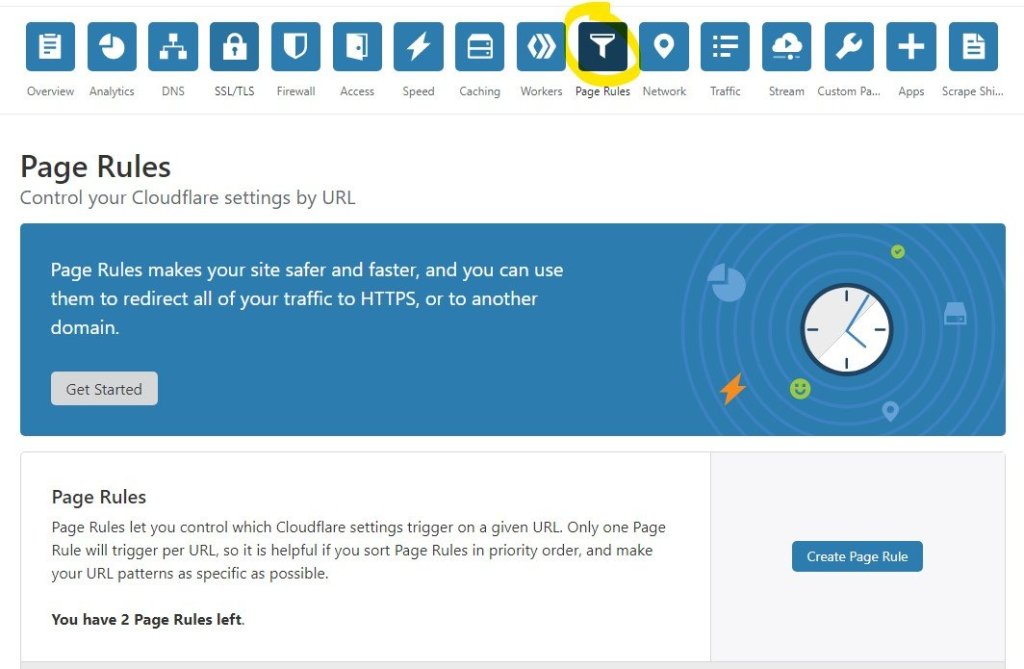
Step 1: Go to Page Rules in your Cloudflare Dashboard.

Cloudflare Page Rules Dashboard

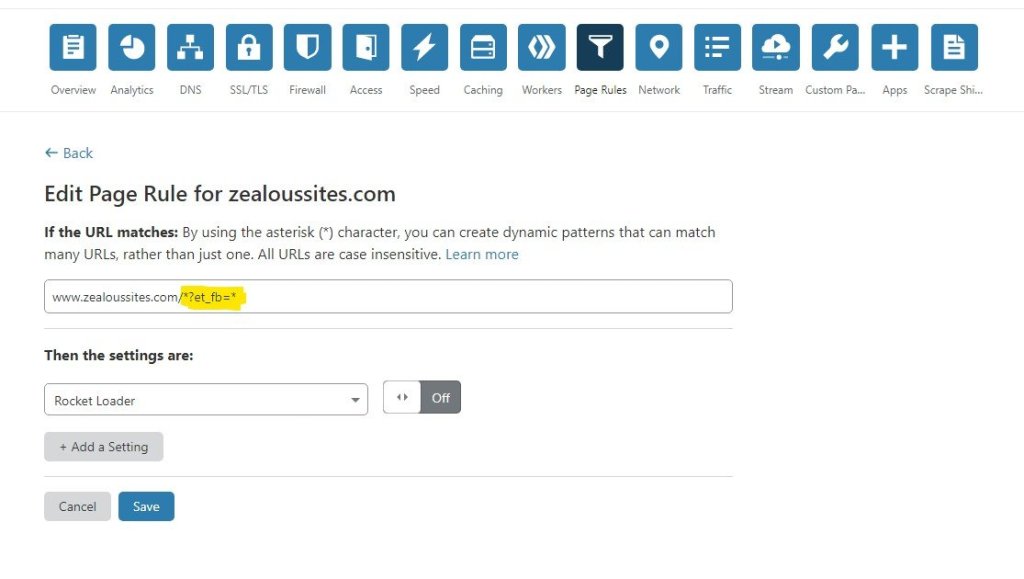
Step 2: Click “Create Page Rule” and use an asterisk (*) to create your dynamic pattern. Since Divi uses “?et_fb=” as the url, I added *?et_fb=* to the end of my domain.

So now, if I go to https://zealoussites.com/what-we-do/wordpress-web-development/?et_fb=someid&PageSpeed=off or https://zealoussites.com/?et_fb=someotherid&someotherquery it will not serve the page with the Rocket Loader. This solved the problem for me. :)

See the screenshot below.

Use those asterisks to make a dynamic URL!

Problem Solved!

That’s it! The problem that had me tearing my hair out and frustrated for hours on end turned out to be a simple page rule issue. It would seem that sometimes you can have too much of a good thing when it comes to Cloudflare.


Hála hála!

keresőszavak: wordpress divi Uncaught ReferenceError: jQuery is not defined

 https://www.zealoussites.com/blog/how-to-fix-divi-page-builder-broke-with-cloudflare


2021. december 25., szombat

2021. június 10., csütörtök

Chia farm

Chia farmok készítése terminálból:
./chia-blockchain/venv/bin/chia plots create -k 32 -n 30 -b 3000 -r 2 -f FARMER_KEY -p PLOT_KEY -d /root/plot -t /tmp/ctemp/

Távoli plot egyszeri lemásolása
rsync -P -a --remove-source-files --rsh=ssh  root@IP_ADDRESS_TO_YOUR_SERVER:/root/plot TARGET_FOLDER

Távoli plot ütemezett lemásolása (óránkénti ellenőrzés)
# crontab -e
0 * * * * rsync -P -a --remove-source-files --rsh=ssh  root@IP_ADDRESS_TO_YOUR_SERVER:/root/plot TARGET_FOLDER


https://serverspace.us/support/help/automate-tasks-with-cron-ubuntu-20-04/


Események grafikus követése: https://github.com/stolk/chiaharvestgraph


Minden ami Chia: chialinks.com/

2020. november 18., szerda

Linux Flatpak szoftver régi verzió telepítése (Zoom példa)

Zoom telepítése

flatpak install flathub us.zoom.Zoom


Régi verziók listája

flatpak remote-info --log flathub us.zoom.Zoom


...

          Kommit: fcd07f9b9db535f1e753bb193ca1f306619e6c7b4076359445eae3a8d70c52da

           Tárgy: Update zoom.tar.xz to 5.3.472687.1012 (66c7d92d)

           Dátum: 2020-10-12 11:33:50 +0000

...


Egy konkrét régi verzió telepítése

sudo flatpak update --commit=fcd07f9b9db535f1e753bb193ca1f306619e6c7b4076359445eae3a8d70c52da us.zoom.Zoom


Automatikus frissítések letiltása

sudo flatpak mask us.zoom.Zoom

2020. november 8., vasárnap

COVID statisztika letöltése és táblázatba exportálás Python szkript - covid2xls.py

Előkövetelmények:
  • Python 3
  • Két python könyvtár telepítése
    • pip3 install pandas 
    • pip3 install xlwt
 
Futtatás: python3 covid2xls.py

Kód:
 
import requests
import bs4
from bs4 import BeautifulSoup
import pandas as pd

#######################xlwt###########################

import xlwt
from xlwt import Workbook

wb = Workbook()

sheet1 = wb.add_sheet('Sheet 1')
sheet1.write(0, 0, 'Sorszám ')
sheet1.write(0, 1 ,'Nem')
sheet1.write(0, 2 ,'Kor')
sheet1.write(0, 3 ,'Alapbetegségek')

count=0

#######################xlwt###########################

for i in range(0,40):
    

    user_agent = 'Chrome/80.0.3987.132 Mozilla/5.0'
    response = requests.get(f"https://koronavirus.gov.hu/elhunytak?page={i}", stream=True,headers={'User-Agent': user_agent})

    soup = BeautifulSoup(response.text, 'html.parser')

    tables = soup.find_all('table')

    df = pd.read_html(str(tables))[0]

    print(df)

    for i in range(0,len(df["Sorszám"])):
        count=count+1
        sheet1.write(count, 0, str(df["Sorszám"][i]))
        sheet1.write(count, 1 ,str(df["Nem"][i]))
        sheet1.write(count, 2 ,int( df["Kor"][i]))
        sheet1.write(count, 3 ,str(df["Alapbetegségek"][i]))
        wb.save("out.xls")

2020. október 14., szerda

GNU Linux Mint 20 LTS szoftverek telepítése

sudo apt-get install -y vlc nautilus-image-converter audacity picard gimp krita p7zip bleachbit meld filezilla k3b

# OBS Studio - videók streamelése, képernyőfelvétel
sudo apt install ffmpeg
sudo add-apt-repository ppa:obsproject/obs-studio
sudo apt install -y obs-studio

# LibreOffice 7 irodai programcsomag
sudo add-apt-repository ppa:libreoffice/libreoffice-7-0
sudo apt install -y libreoffice 

sudo apt purge libreoffice-l10n-es libreoffice-l10n-pt libreoffice-l10n-zh-cn libreoffice-l10n-pt-br libreoffice-l10n-de libreoffice-l10n-ru libreoffice-l10n-zh-tw libreoffice-l10n-en-za libreoffice-l10n-it

# NFS meghajtók csatolásához

sudo apt install -y nfs-common


# --------------------------------------------------------

cd
cd Letöltések
cd Downloads

# --------------------------------------------------------

# Google szolgáltatások nélküli sima Chromium böngésző
# https://github.com/ungoogled-software/ungoogled-chromium-debian

echo 'deb http://download.opensuse.org/repositories/home:/ungoogled_chromium/Ubuntu_Focal/ /' | sudo tee /etc/apt/sources.list.d/home-ungoogled_chromium.list > /dev/null
curl -s 'https://download.opensuse.org/repositories/home:/ungoogled_chromium/Ubuntu_Focal/Release.key' | gpg --dearmor | sudo tee /etc/apt/trusted.gpg.d/home-ungoogled_chromium.gpg > /dev/null
sudo apt update
sudo apt install -y ungoogled-chromium

# --------------------------------------------------------

# Google Chrome böngésző
wget https://dl.google.com/linux/direct/google-chrome-stable_current_amd64.deb
sudo dpkg -i google-chrome-stable_current_amd64.deb

# --------------------------------------------------------

# Zoom videókonferencia
wget https://zoom.us/client/latest/zoom_amd64.deb
sudo dpkg -i zoom_amd64.deb

# Másik verzió kell? https://forraskod.blogspot.com/2020/11/linux-flatpak-szoftver-regi-verzio.html


# --------------------------------------------------------


# Visual Studio Code fejlesztőkörnyezet (IDE)
# https://code.visualstudio.com/docs/?dv=linux64_deb
wget https://go.microsoft.com/fwlink/?LinkID=760868 -O vscode.deb
sudo dpkg -i vscode.deb

# --------------------------------------------------------

# Signal private messenger - titkosított csevegő
# https://www.signal.org/download/

# NOTE: These instructions only work for 64 bit Debian-based
# Linux distributions such as Ubuntu, Mint etc.

# 1. Install our official public software signing key
wget -O- https://updates.signal.org/desktop/apt/keys.asc |\
  sudo apt-key add -

# 2. Add our repository to your list of repositories
echo "deb [arch=amd64] https://updates.signal.org/desktop/apt xenial main" |\
  sudo tee -a /etc/apt/sources.list.d/signal-xenial.list

# 3. Update your package database and install signal
sudo apt update && sudo apt install signal-desktop


# --------------------------------------------------------

# Elements titkosított csoportos csevegő (Slack-hez hasonló)
sudo apt install -y wget apt-transport-https

sudo wget -O /usr/share/keyrings/riot-im-archive-keyring.gpg https://packages.riot.im/debian/riot-im-archive-keyring.gpg

echo "deb [signed-by=/usr/share/keyrings/riot-im-archive-keyring.gpg] https://packages.riot.im/debian/ default main" | sudo tee /etc/apt/sources.list.d/riot-im.list

sudo apt update
sudo apt install element-desktop

# --------------------------------------------------------

# Draw.io diagram rajzoló

# https://github.com/jgraph/drawio-desktop/releases/latest 

# --------------------------------------------------------

# CudaText haladó szövegszerkesztő - 10 GB-os fájlokat is megnyit

# http://www.uvviewsoft.com/cudatext/

# --------------------------------------------------------

Acetoneiso - ISO BIN NRG MDF IMG fájlok megnyitása

sudo apt-get install acetoneiso

# NoiseTorch - Mikrofon zajszűrés (billentyűzet, ventillátor, stb.)

# https://github.com/lawl/NoiseTorch#download--install

cd

wget https://github.com/lawl/NoiseTorch/releases/latest/download/NoiseTorch_x64.tgz

tar -C $HOME -xzf NoiseTorch_x64.tgz

gtk-update-icon-cache

sudo setcap 'CAP_SYS_RESOURCE=+ep' ~/.local/bin/noisetorch

echo "Autostart setup: https://github.com/lawl/NoiseTorch/wiki/Start-automatically-with-Systemd"


2020. augusztus 18., kedd

Wordpress gyorsítás tapasztalatok - cache, bővítmények .htaccess, PHP

  • Mindennek az alapja egy jó "SSD"-s szerver (tárhely), ami gyors válaszidővel rendelkezik
  • Illetve egy gyors téma, pl. GeneratePress
  • Cache bővítmények: WP Super Cache, Hummingbird
  • Képoptimalizálók: Webp, Hummingbird
  • Képek gyorsítása CDN, pl. Jetpack
  • DDoS védelem, biztonság CDN, pl. Cloudflare
  • Ha a szerver támogatja az LSPHP-t, a .htaccess fájlba beírni:

AddHandler application/x-httpd-lsphp74 .php .php5


És a teszt :)
  • https://developers.google.com/speed/pagespeed/insights/
  • https://web.dev/measure/
  • https://gtmetrix.com/
  • https://www.webpagetest.org/

2020. augusztus 17., hétfő

Monit.php malware eltávolítása

Monit.php reklámvírus (malware)

Hogyan tudod megállapítani, hogy fertőzött vagy-e? 

A [honlap-URL]-t cseréld ki a te honlapod címére (pl. https://sajathonlapom.hu)

[honlap-URL]/wp-admin/options-general.php?page=monit


Automatikus eltávolítás: cPanel cron 

A tárhely cpanel felületén találod meg a "Időzített feladatok(cron)" lehetőséget:


Állítsd be hogy percenként egyszer lefusson:

A YOUR_EMAIL_ADDRESS helyére ha beírod az email címedet, akkor értesítést kapsz ha megtalálta (és letörölte) a monit.php-t a rendszer.

find . -type f -name "monit.php" -exec echo {} \; -exec stat {} \; -exec rm -f {} \; | mailx -E -s "monit.php threat deleted" YOUR_EMAIL_ADDRESS


Másik módszer eltávolításra: Anti-Malware from GOTMLS.NET


Ajánlom a telepítését! Ha tetszett, akkor 29$ adományért cserébe már rendszeres, automatikus frissítéseket is beállíthatod, de az ingyenes változat is remekül használható.


Kézi eltávolítás:

1. Töröljük le a fájlkezelővel plugins/monit.php

Vagy ssh parancssorban: find /var/www/html/ -name monit.php -exec rm -rf {} \;

2. A MySQL adatbázisban található javascript fájlok, melyek a nem kívánt reklámokat megjelenítik:

<script type="text/javascript" src="//ofgogoatan.com/apu.php?zoneid=3280383" async data-cfasync="false"></script>

<script src="https://propu.sh/pfe/current/tag.min.js?z=3280389" data-cfasync="false" async></script>

<script type="text/javascript" src="//inpagepush.com/400/3336702" data-cfasync="false" async="async"></script>

2 JBEBP("<script*.php?zone*</script>") in wp_options:ad_code":167655.1


SQL parancs amit a phpMyadmin felületre be lehet másolni, aztán a megtalált táblákat törölni:

SELECT * FROM `wp_options` WHERE `option_name` IN ( ‘default_mont_options’, ‘ad_code’ , ‘hide_admin’, ‘hide_logged_in’ , ‘display_ad’, ‘search_engines’ , ‘auto_update’, ‘ip_admin’ , ‘cookies_admin’, ‘logged_admin’, ‘log_install’)

Forrás

https://medium.com/@ianarman/monit-php-wordpress-malware-9ffa5c338e9a

https://www.getastra.com/blog/911/fix-monit-php-monetization-hack/

2020. augusztus 8., szombat

Ékezetes honlap regisztrálása

DNI - Erről jó tudni, így kell megadni több helyen is (pl. kiegészítő domain felvételekor)

https://en.wikipedia.org/wiki/Internationalized_domain_name

Ebből: árvíztűrőtükörfúrógép.hu

Ez lesz: xn--rvztrtkrfrgp-bbb7j2b8f0b9d7a21oft.hu

Online átalakító: punycoder.com


Cloudflare átköltöztetés

Add an A, AAAA, or CNAME record for www so that www.DOMAIN_NEVE.hu will resolve.

Add an A, AAAA, or CNAME record for your root domain so that DOMAIN_NEVE.hu will resolve.

Add an MX record for your root domain so that mail can reach @DOMAIN_NEVE.hu addresses.

Some of your DNS only records are exposing IPs that are proxied through Cloudflare. Make sure to proxy all A, AAAA, and CNAME records pointing to proxied records to avoid exposing your origin IP.


DNS gyorsítótár ürítése Ubuntu 18.04+

 sudo systemd-resolve --flush-caches


2020. június 28., vasárnap

ZFS telepítés és 2 lemez tükrözése

sudo apt install zfs-dkms -y

lsblk --ascii -o NAME,PARTUUID,LABEL,PATH,FSTYPE

sudo zpool create -f -o ashift=12 -m /home VDEV_NAME mirror /dev/disk/by-partuuid/DISK1_partuuid /dev/disk/by-partuuid/DISK2_partuuid

sudo zfs create VDEV_NAME/DATASET_NAME

zpool set cachefile=/etc/zfs/zpool.cache VDEV_NAME
systemctl enable zfs.target

zfs set relatime=on VDEV_NAME
zfs set compression=lz4 VDEV_NAME

sudo zpool status


# https://low-orbit.net/zfs-guide
# https://briankoopman.com/moving/
# https://pthree.org/2012/12/04/zfs-administration-part-i-vdevs/

2020. június 7., vasárnap

Docker telepítés - Fix Docker mess Ubuntu 18.04

sudo apt purge docker.io docker-compose
sudo apt install docker.io docker-compose

docker-compose is already the newest version (1.17.1-2).
docker.io is already the newest version (19.03.6-0ubuntu1~18.04.1).


@whysthatso Just ran into this issue, could you please describe the full solution step by step? Do I need to uninstall docker-compose and stuff and then reinstall docker or what?
as far as i remember:
  • uninstall everything docker-related
  • check if there is /etc/systemd/system/docker.service, delete it
  • install docker-compose
or it could be:
  • uninstall everything docker-related
but yeah, sorry, i realized i should have contextualized my comment a bit better
  • install docker-compose
  • check if there is /etc/systemd/system/docker.service, delete it
try both, can't really mess anything up here


kwmartin commented

Needed all of:
  1. apt-get remove and re-install using curl as Kirill-Babkin suggests (and restart socker to be safe)
  2. add user to docker group using usermod
    sudo usermod -aG docker $USER
    logout and login
  3. undefine DOCKER_HOST (as suggested by rkazak at https://forums.docker.com/t/docker-commands-require-sudo/12987/2) which I had earlier set using >
  4. export DOCKER_HOST=127.0.0.1:2375
    as suggested by jamethy and shin
    This was on an RPi 3B. After all of this, docker is now working. Is there any chance this could be cleaned up so others don't have to go through this painful experience, as it is experiences like this docker is designed to fix? Just a suggestion.
    https://github.com/docker/compose/issues/4181
sudo service docker restart

2020. május 29., péntek

PDF fájl átalakítása Wiki formátumra

sudo apt install pandoc
sudo apt-get install poppler-utils

PDF --> HTML
sudo mkdir kimenet
sudo pdftohtml -s -p -fmt png -nodrm "file.pdf" "file/file.html"

You can type pdftohtml -h to gain a better understanding of available parameters.
I've explained the parameters used here for the sake of understanding the command:
  • -s contains all of the output within one HTML document (excluding the outline.
  • -p attempts to replaces pdf internal linking with html links.
  • -fmt controls the output format of images, with png and jpg being valid options.
  • -nodrm igores download rights management restrictions on the PDF.
  • -i ignores images. I didn't use this, but it felt prudent to mention as in some cases it may massively speed your output format.

Alternatív módszer: Poppler pdftotext

pdftotext -htmlmeta "file.pdf" "file.html"

 Replace "file" with the name of the file you want to parse and with the name of the HTML file you want to write your text output to. 
 The `-htmlmeta` option creates an HTML version of the text in your PDF. (This is much less fancy than the previous command and only puts the text in `pre` tags). You should see an HTML file in your directory which you can open to check the results of. Depending on the formatting of your source PDF file, you may find that Poppler is variable in it's effectiveness. You can try running `pdftotext -h` for information on other command options that may improve or worsen your results. 

Pandoc: HTML --> MediaWiki

 pandoc file.html -f html -t mediawiki -s -o file.txt
  • -f bemeneti formátum
  • -t kimeneti formátum
  • -s Standalone adds a header and footer to the document, rather than producing a document fragment.
  • -o The name of the output file.
Pandoc user guide.
It is possible you may run into an error with Pandoc, presumably caused by your file being too large. I ran into this error and some fixes can be found here.

Opció: rossz kódolás kitakarítása

Depending on your PDF encoding, you may find strange Unicode charecters in your HTML output. This step is intended to clean up this output to the best possible degree of accuracy. ftfy, stands for fixes text for you, and it's a Python library with a command-line interface. We'll be using the command line to clean our files. This step is preformed before using Pandoc.

ftfy telepítése:
git clone https://github.com/LuminosoInsight/python-ftfy.git
cd python-ftfy
sudo python setup.py install
Or, if you system has pip, pip install ftfy. Note that if you want to use a version of 5.0 (most recent available at time of writing) or later, you need Python 3. I used Python 2.x with ftfy 4.1.1 for this answer. Using the same directory, type the following command:
 ftfy -o file_clean.html --preserve-entities file.html
Optionally, you may include the --guess option to have ftfy guess your encoding, or --encoding if you know your encoding. This may produce better results.

2020. május 28., csütörtök

Resolving the 502 Bad Gateway Error in Nginx, Ubuntu 16.04 - 20.04 upgrade and PHP5 - PHP7 upgrade

PHP 7.2 Ubuntu 20.04 502 Bad gateway Error message

Set path correctly in
sudo nano /etc/nginx/sites-available/default
sudo nano /etc/nginx/snippets

BAD: fastcgi_pass unix:/var/run/php/php7.0-fpm.sock;
GOOD: fastcgi_pass unix:/var/run/php/php7.2-fpm.sock;
---


sudo nano /etc/php/7.0/fpm/pool.d/www.conf

change
listen = 127.0.0.1:9000
to
listen = /var/run/php7.2-fpm.sock


sudo apt-get -y install php7.2 php7.2-mysql php7.2-fpm php-fpm

chown :www-data /var/run/php/php7.2-fpm.sock

sudo apt install php-mysql

Reading package lists... Done
Building dependency tree     
Reading state information... Done
The following additional packages will be installed:
  php7.2-mysql
The following NEW packages will be installed:
  php-mysql php7.2-mysql
0 upgraded, 2 newly installed, 0 to remove and 0 not upgraded.
Need to get 125 kB of archives.
After this operation, 432 kB of additional disk space will be used.
Do you want to continue? [Y/n] y
Get:1 http://us.archive.ubuntu.com/ubuntu bionic-updates/main i386 php7.2-mysql i386 7.2.24-0ubuntu0.18.04.6 [123 kB]
Get:2 http://us.archive.ubuntu.com/ubuntu bionic/main i386 php-mysql all 1:7.2+60ubuntu1 [2,004 B]
Fetched 125 kB in 0s (266 kB/s)     
Selecting previously unselected package php7.2-mysql.
(Reading database ... 86153 files and directories currently installed.)
Preparing to unpack .../php7.2-mysql_7.2.24-0ubuntu0.18.04.6_i386.deb ...
Unpacking php7.2-mysql (7.2.24-0ubuntu0.18.04.6) ...
Selecting previously unselected package php-mysql.
Preparing to unpack .../php-mysql_1%3a7.2+60ubuntu1_all.deb ...
Unpacking php-mysql (1:7.2+60ubuntu1) ...
Setting up php7.2-mysql (7.2.24-0ubuntu0.18.04.6) ...

Creating config file /etc/php/7.2/mods-available/mysqlnd.ini with new version

Creating config file /etc/php/7.2/mods-available/mysqli.ini with new version

Creating config file /etc/php/7.2/mods-available/pdo_mysql.ini with new version
Setting up php-mysql (1:7.2+60ubuntu1) ...
Processing triggers for libapache2-mod-php7.2 (7.2.24-0ubuntu0.18.04.6) ...
Processing triggers for php7.2-fpm (7.2.24-0ubuntu0.18.04.6) ...
NOTICE: Not enabling PHP 7.2 FPM by default.
NOTICE: To enable PHP 7.2 FPM in Apache2 do:
NOTICE: a2enmod proxy_fcgi setenvif
NOTICE: a2enconf php7.2-fpm
NOTICE: You are seeing this message because you have apache2 package installed.


sudo service php7.2-fpm restart
sudo service php-fpm restart
sudo service nginx restart


Check /var/log/nginx/error.log if sth is still not ok.

2020. május 26., kedd

Syntax errors in translated files - Letter to poeditor.com

I've used poeditor with Google Translate to translate open source software - LearnPress and Give-WP plugins.

I've paid 8$ yet the output is full of syntax errors - special characters like & and $ are messed up, some important extra lines omitted starting with # (see e.g. Learnpress WP plugin PO file, lines: "#, php-format").

Examples from Give-WP translation - full source below:

1. Unwanted character conversion - and worse, bad output due to extra space:
msgid "Next »"
msgstr "Következő & raquo;"

2. Extra spaces added that breaks variables:
msgid "Edit Donor: %1$s %2$s"
msgstr "Adományozó szerkesztése:% 1 $ s% 2 $ s"

3. Wrong character encoding:
msgid "Before - %s&#x200e;10"
msgstr "Előtt -% s &# x200e; 10"

etc...

Original:
https://www.pastefs.com/pid/211223

Translated but with syntax errors
https://www.pastefs.com/pid/211222

The Transifex translation portal also does not accept the file you generate as an input file due to the syntax errors.

Can you fix these errors?

2019. december 22., vasárnap

OnePlus 3 gyári visszaállítás

OP3 factory reset:
https://www.androidsage.com/2017/03/22/restore-to-stock-oneplus-3-3t-with-latest-oxygen-os-firmware-complete-unroot/

OP3 Recovery Image:
http://oxygenos.oneplus.net.s3.amazonaws.com/recovery_op3.img

Fastboot Ubuntu:
https://blog.droidzone.in/2017/10/16/install-adb-and-fastboot-for-oneplus-3/

Custom TWRP Recovery:
https://twrp.me/oneplus/oneplusthree.html

2019. január 25., péntek

Send mass emails from Excel

If you create four columns:
Name Email Link Status

You can use this VBA macro to send the content of links to the specified emails.

Sub test2()

    Dim OutApp As Object
    Dim OutMail As Object
    Dim cell As Range

    Application.ScreenUpdating = False
    Set OutApp = CreateObject("Outlook.Application")

    For Each cell In Worksheets("Sheet1").Columns("B").Cells
        Set OutMail = OutApp.CreateItem(0)
        If cell.Value Like "?*@?*.?*" Then      'try with less conditions first
            With OutMail
                .To = Cells(cell.Row, "B").Value
                .Subject = "Your SUBJECT"
                .Body = "Hi " + Cells(cell.Row, "A") + "," + vbCrLf + vbCrLf + "YOUR_MESSAGE" + vbCrLf + " Your  result: " + vbCrLf + Cells(cell.Row, "C").Value + vbCrLf + vbCrLf + "Best regards,"
                .display
                'Stop                            'wait here for the stop
            End With
            Cells(cell.Row, "D").Value = "sent"
            Set OutMail = Nothing
        End If
    Next cell

    'Set OutApp = Nothing                        'it will be Nothing after End Sub
    Application.ScreenUpdating = True

End Sub

2019. január 22., kedd

Generate OpenSSL key for webapp

openssl req -x509 -out ssl.crt -keyout ssl.key \
  -newkey rsa:2048 -nodes -sha256 \
  -subj '/CN=localhost' -extensions EXT -config <( \
   printf "[dn]\nCN=localhost\n[req]\ndistinguished_name = dn\n[EXT]\nsubjectAltName=DNS:localhost\nkeyUsage=digitalSignature\nextendedKeyUsage=serverAuth")

2018. augusztus 17., péntek

Beyond browsers: HTTP/2 and WebSockets

Status: Draft

Architectural considerations for choosing a communication protocol

The purpose of this article to give a high-level overview with some practical insights into the current state of communication protocols frequently used across internet-enabled devices.

HTTP/2 is an IETF proposed standard (referenced as RFC 7540) that has been issued in May 2015. It is the continuation of the widely used HTTP 1.1 version that has been published in 1997. HTTP/2 is still a relatively new piece of technology, according to caniuse.com, about 76% of internet-connected clients can take advantage of its presence on a web server.

One could ask: why do we need a new core protocol for the internet, when the previous served us great for almost two decades? The answer lies in the fact that Internet changed from being niche to the basic fabric of our societies. In 1997, there were about 120 million internet users. Today, this number is more than 3,4 billion. Web pages become increasingly complex, popular sites often creating as many as forty TCP connections for a single client (check netstat | grep http). This and many other workarounds, such as embedding CSS or JS in HTML documents to avoid extra file transfers, show that delivering a rich web experience needs a more fundamental redesign, in this case on the transport protocol level.

HTTP/2 provides a set of well-thought improvements over its predecessor: sharing a TCP connection between resources becomes possible without one blocking another. This is achieved by multiplexing that creates small chunks of data and interleaves them with each other. Header compression reduce the HTTP overhead while preserving the trait of being a stateless protocol. Changing to a binary wire format from text-based will mandate the use of special tools (e.g. WireShark 2.0 or newer) but it will also make processing faster and straightforward.


HTTP/1.1
HTTP/2
Format
Text-based
Binary
Multiplexing (a single TCP connection for multiple data streams)
No
Yes
Header compression
No
Yes
Server push
No
Yes
Prioritization
No
Yes
WebSockets
HTTP/2
Format
Binary
Binary
Multiplexing
No
Yes
Header compression
N/A
Yes
gRPC
Socket.io
Format
Binary
Binary (WebSocket)
Multiplexing
Header compression

If the goal is to keep connection through an unlocked arrive at the data, it may be that we should use HTTP instead of WebSocket was.

But if you insist on for HTTP, then the implementation will depend on the client side to receive the data in order to manage. The solution is probably the most reliable Server Sent Events. To do that you can imagine in this Node.js library to use: https://www.npmjs.com/package/sse but it may be that the server does not work with HTTP2 (in this case, if you send an error report, you can count on it that the the problem will be fixed deadline but I can not guarantee :)).

If the client-side JavaScript code will not, but the browser itself will process the data (eg, video streaming, etc.) You can use the standard Node.js stream classes to make more installments submit the data to the client, this class is a descendant of HTTP Response object. Such a receiving stream from JS is not fully reliable, that the package can be shifted borders, etc. so I do not recommend it if you want to receive the incoming data in JS.

But there are higher-level abstractions, for example. socket.io the library, which hides the details of implementation and provides bi-directional packet data communication between the client and the server. This is probably the easiest solution if you do not care about the transmission medium, you receive only the data simply and reliably.

Actually, all of which they are independent from the HTTP2, only the HTTP2 push server could be used for something similar, but this is not yet used by JS API, so you think it will fail.

---


Now let's abstract away from browser-specific details.


The HTTP2 would also be a good choice if Browser server communication is not the case. The GRPC, which Google RPC framework for the HTTP2 from buildings, for instance.


If the low-level streams to HTTP2 are accessible (not just through the browser JS APIs), it give much more flexibility in the protocol. The node http2 in such a low level of access gives the http2.protocol API, which is broadly documented here: https://github.com/molnarg/node-http2/blob/master/lib/protocol/index.js

Low-level stream of calls handled are Node.js Stream API (cork / uncork I will destroy used indefinitely flush roughing), en thought that the browser is not something :) JS APIjaban but TCP is not recommended in some cases based on this, if luggage based communication you want to implement, because the area may want to package the client can shift due to the buffering. Instead, the HTTP2 has a framing layer, which in turn can be used for packet based communication when approaching low-level access to the HTTP2 implementations (such as http2.protocol API).

The HTTP2 push API can be interesting if you look at your ass non-browser client. The only strange saga that's always a push to stream should have a pre-existing non-streaming push you. The Web is about both the validity, to say the HTML file is download the client and the server push to the corresponding CSS, JS, etc. files. If you are not a web of context, it is not unique to mar what belongs push streams, in many contexts does not make sense to declare it.

If the framing layer is HTTP2, push, or other low-level HTTP2 things you want to use a PoC establishment, good question which one should you use HTTP2 lib, I suspect that this sort of thing is no one is too good documentation and API

Selecting the most suitable communication protocol for industry devices or Internet of Things (IoT) is a challenging task. Changing an existing architecture is even more so. Creating a migration plan is required to ensure a good fit with existing deployments and network characteristics. Other protocols, such as CoAP or MQTT are also popular in the IoT world, but HTTP/2 can be also satisfactory in many use cases where resource constraints are not so low as described in RFC 7228 (10 KiB of RAM and 100 KiB of code space). This could be especially true when used with a battle-hardened framework like gRPC. Which has just been released on 23 August 2016 with version 1.0.

A small remark: we can remember Gmail being titled as “Beta” even when it far surpassed any other mail provider in quality, so version 1.0 at Google means a different thing than in other large software houses.

gRPC perfectly fits other criteria as well: it is based on standards, it’s open-source and even the wire-level data format is well-documented – therefore vendor lock-in can be easily avoided.

Before we go further, let’s see what other architectural approaches we could consider.

Should a communication middleware be used?

Middleware solutions provide loose coupling and extra features to deal with communication tasks in a complex enterprise environment. However, these extra features come with an added installation and management complexity that are not rationalised by all use cases. So as always, a careful analysis should take place regarding pros and cons.

Robust communication

Middleware solutions provide services like guaranteed delivery that are useful if a client or network error occurs.

Deploying middleware

Firewall ports

Firewall management is a cumbersome process in corporate environments. Well, for good reasons, firewall policies are fundamental to IT security. In addition to providing a business rationale, usually more than one managers need to authorize such a change. Therefore it often takes days or even weeks to get through.

Reasons for choosing HTTP-REST as a base protocol

·         Port 80 and 443 is open everywhere

·         Lo-REST (using GET and POST requests) can pass almost all firewalls even where other HTTP methods may not get through

·         Middleware solutions need a special port (AMQP: 5672, MQTT: 1883/8883), managing it in corporate IT environment can be cumbersome

Choosing HTTP-REST as a base protocol

Developers know it, easy to start with, go through firewalls

Challenges

TCP is bidirectional but how to realise in practice with request-response semantics

Low-level approach – streams and frames

·         Browser focus

·         API documentations

GRPC

·         Features

·         Characteristics of a truly open and mature communication protocol